![logo-blue copy 2.png]](https://help.nozzle.io/hs-fs/hubfs/logo-blue%20copy%202.png?height=33&name=logo-blue%20copy%202.png)
You can monitor all your digital assets in Nozzle – not just your domain – so you can see where you stack up against the competition for your local customers.
The first thing to do is set up a Brand that has your Google Business Profile listing as one of its Brand Properties.
(If you have already set this up, skip this first part.)
Click on the Manage Project button at the top right of any dashboard and then click Manage Brands.
- Select an existing Brand (In this case, select an “Owned” brand.)
- Click the +Google Business Profile button under Add Common Properties.
- Enter your Google Business Profile ID (CID) in the field. (You can find that number by following the steps in this help article.)
- Click Save Brand.
If you are creating a new Brand instead of using an existing one, you can get a comprehensive look at how to add Brands to your project in this article.
Now, with your Google Business Profile added to your brand, you can start getting into the data.
On the Performance Overview page, select Brand Property in the Focus dropdown. Then select the property you created to track your local listings.

This will show you a list of your local rankings.
If you appear in the Map Pack, Nozzle shows two numbers in the Rankings column.
The first number (after a colorful dot) tells you where you are actually ranking in the column, the second number (after a gray dot) shows you where you are ranking in a local pack.
The number following the gray dot is referred to as the Item Rank in Nozzle.
So, if you had something that looks like this:
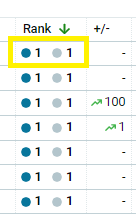
It means the Map Pack is ranking in the number one spot, and your company ranks first of all the possible spots in the pack.
One like this, on the other hand:
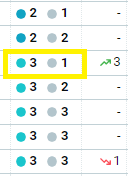
Means that you still rank at the top of the Map Pack, but the Pack is further down the SERP and appears in the third place, below a couple organic rankings or other features.
Now you know how to pull out the data related to your Google Business Profile efforts so you can see how you are doing in the local scene.